IT Outsourcing
Sep 16, 2025
KPI in IT Projects: How to Measure Team Success and Avoid the Pitfall of ‘Metrics for Metrics’

Mariia Kuryshchuk

Why KPIs Matter in Project Management
In modern IT companies, effective project management is impossible without a structured approach to performance measurement. This is especially true in outsourcing models, where client trust is critical. Clients expect not just a completed product but also transparency throughout the development process.
When clients can clearly see KPIs and understandable productivity indicators, they get answers to three key questions: how the work is progressing, what efforts are being made, and what results are being achieved. This reduces misunderstandings, creates a sense of control over the project, and strengthens the company’s position in a highly competitive outsourcing market.
However, KPIs aren’t just for external reporting. On the internal side, employee and team KPIs play a crucial role in helping define direction, set priorities, and evaluate performance. When specialists can see how their efforts contribute to broader business goals, they feel more engaged, motivated, and accountable. It’s a core element of performance management that builds growth—not just control.
From my own experience managing teams, I know reactions to KPIs can vary. Some colleagues view them positively when there’s a clear explanation of how the metrics tie to business outcomes. Others are wary—especially if the KPIs feel like a mechanical monitoring tool. In most cases, the problem isn’t the metrics themselves, but a lack of transparent communication. If the team doesn’t understand the “why” behind KPIs, they quickly become just “metrics for the sake of metrics.”
It’s a manager’s job to provide the context, explain the logic, and integrate KPIs into daily workflows in a way that drives outcomes—not friction.
KPIs as a Decision-Making Tool
The true value of KPIs lies in their ability to influence decisions—not just reflect the status quo. They should not become “reporting for reporting’s sake,” but instead serve as a real lever for improving team performance and increasing transparency.
In outsourcing and outstaffing models, this dual-layer approach works well:
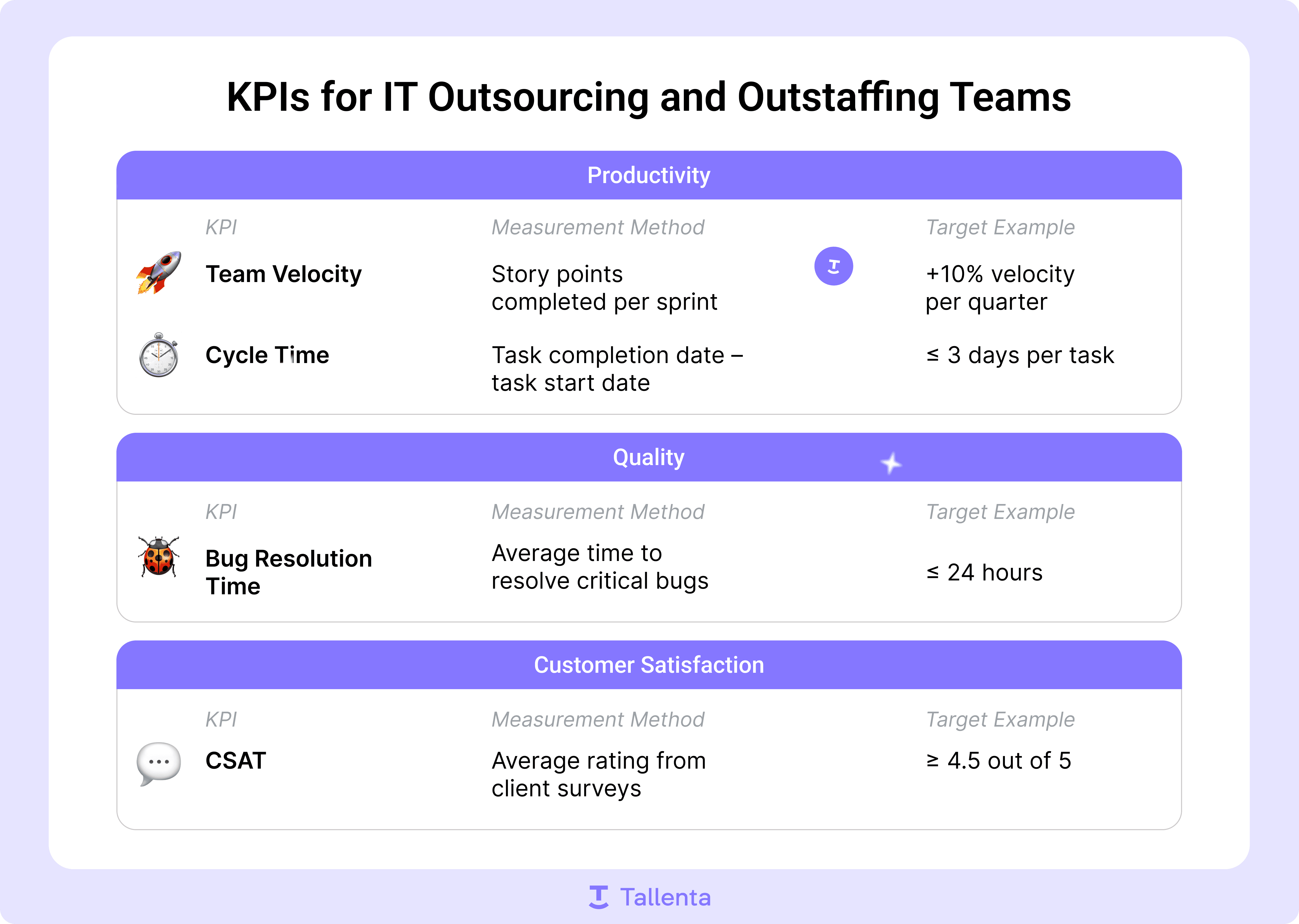
There are core KPIs the team tracks continuously (such as Team Velocity, Cycle Time, Bug Resolution Time, Code Coverage). These directly influence project predictability, quality, and team performance evaluation.
Additional KPIs are introduced temporarily to address specific issues identified during retrospectives. Once the problem is resolved, the KPI is removed.
With this approach, KPIs move from being a tool of control to a tool of development.
Case Study: Using KPIs to Reduce Cycle Time
On one outsourcing project, we faced an issue where tasks were frequently returned for rework due to bugs—significantly increasing our Cycle Time. To identify the root causes, we categorized returns in Jira: poor task descriptions, changing requirements, design mismatches, backend technical changes, etc.
After the first round of analysis, we spotted patterns, identified key problem areas, and outlined an action plan. But then we hit a snag: developers started spending more time justifying data in reports than actually solving bugs. Classic example: when a KPI starts living its own life and the team works for the metric, not the result.
To reset the focus, I organized an open conversation with the team and reminded everyone of the real goal—not to generate “pretty numbers,” but to genuinely reduce errors. This communication helped us refocus. In the next cycle, we saw a real reduction in Cycle Time and a shift in root cause proportions.
It was a powerful reminder: clear communication and regular goal check-ins are crucial when working with KPIs.
KPIs as a Tool for Team Development
Another important KPI application is individual development. Within performance reviews, KPIs help identify each specialist’s strengths and areas for growth. For example:
One developer may complete tasks quickly but receive frequent bug-related returns.
Another may take more time but consistently delivers high-quality outcomes.
This signals to the team lead that Developer #1 might benefit from mentoring or QA support, while team processes could be adjusted to balance speed with quality. In this way, KPIs become part of your performance management and talent development system—not just a mechanism of oversight.
The Role of OKRs in Performance Management
To avoid turning KPIs into an end in themselves, we pair them with the OKR framework. This maintains alignment with business strategy and avoids the “working for the metric” trap.
How this works in practice:
Each quarter, the team sets 2–3 Objectives with measurable Key Results tied to product strategy.
KPIs are integrated into the performance management system, not tracked in isolation.
At the end of the quarter, we compare results to goals and get a transparent progress snapshot.
Real impact we’ve seen:
Client-reported bugs dropped by 25%.
Technical debt decreased by 10%—and continues to shrink due to better prioritization.
Now, the team sees a direct connection between KPIs and product success. This improves not just performance, but also motivation: people see that their work has tangible, measurable impact.
Learn more about performance tracking, KPIs, OKRs, and performance reviews in our guide to performance review in IT.
How to Avoid the “Metrics for the Sake of Metrics” Trap
To make KPIs truly work, we recommend the following best practices:
Tie KPIs to business goals — e.g., reducing Cycle Time directly supports faster time-to-market.
Explain the purpose of each metric — without context, they feel like surveillance tools.
Limit the number of KPIs — 3–5 key metrics are enough to evaluate performance in outsourcing teams.
Remove irrelevant KPIs — if a metric doesn’t impact decision-making, it’s not worth tracking.
Focus on outcomes, not numbers — KPIs are indicators, not the end goal.
Examples of KPIs for IT Outsourcing and Outstaffing Teams
Final Thoughts
KPIs in IT are a powerful tool—but only if they’re meaningfully connected to product strategy and business objectives. In outsourcing and outstaffing models, KPIs also help build transparency, demonstrate work quality, and foster client trust.
Project management and team performance evaluation shouldn’t be based on surface-level metrics, but on real outcomes. KPIs help identify problems early, improve workflows, and support sustainable team growth.
The bottom line? Focus on results—not just pretty reports.
Tallenta Presentation
FAQs
Still Have Questions? We’re Here to Help!
Contact our support team anytime with your questions or to get assistance — we’ll make sure you get the answers and guidance you need.